Progressive tree view
One column per level, side by side. Depth appears as you move into it, so nothing is revealed before you ask for it.
 TreetorView pricing
A focused, keyboard-first tree editor
Focus on one branch. Keep the path in view.
Treetor is a local-first desktop app for hierarchical notes, picture items, and mind-map-like thinking. The editor shows one column per level, so you can go deeper without losing sight of where you came from, and reshape the structure without leaving the keyboard. Optional end-to-end encrypted sync keeps every tree current across your devices. Text notes are free; Pro picture tools include a 30-day trial.
Less clutter. More context. Clearer thinking.
The idea behind Treetor
Your ideas may form a large tree, but your attention belongs in one place at a time. Treetor shows one column per level and gives your typing to a single active branch, so you can go deeper without losing track of where you are.
The level you came fromThe active columnThe next level, previewed
One column per level, side by side. Depth appears as you move into it, so nothing is revealed before you ask for it.
A green bar marks the one column that takes your typing. The level you came from stays beside it, still live.
Ctrl and Alt with the arrow keys move between levels, reorder items, and change how deep they sit.
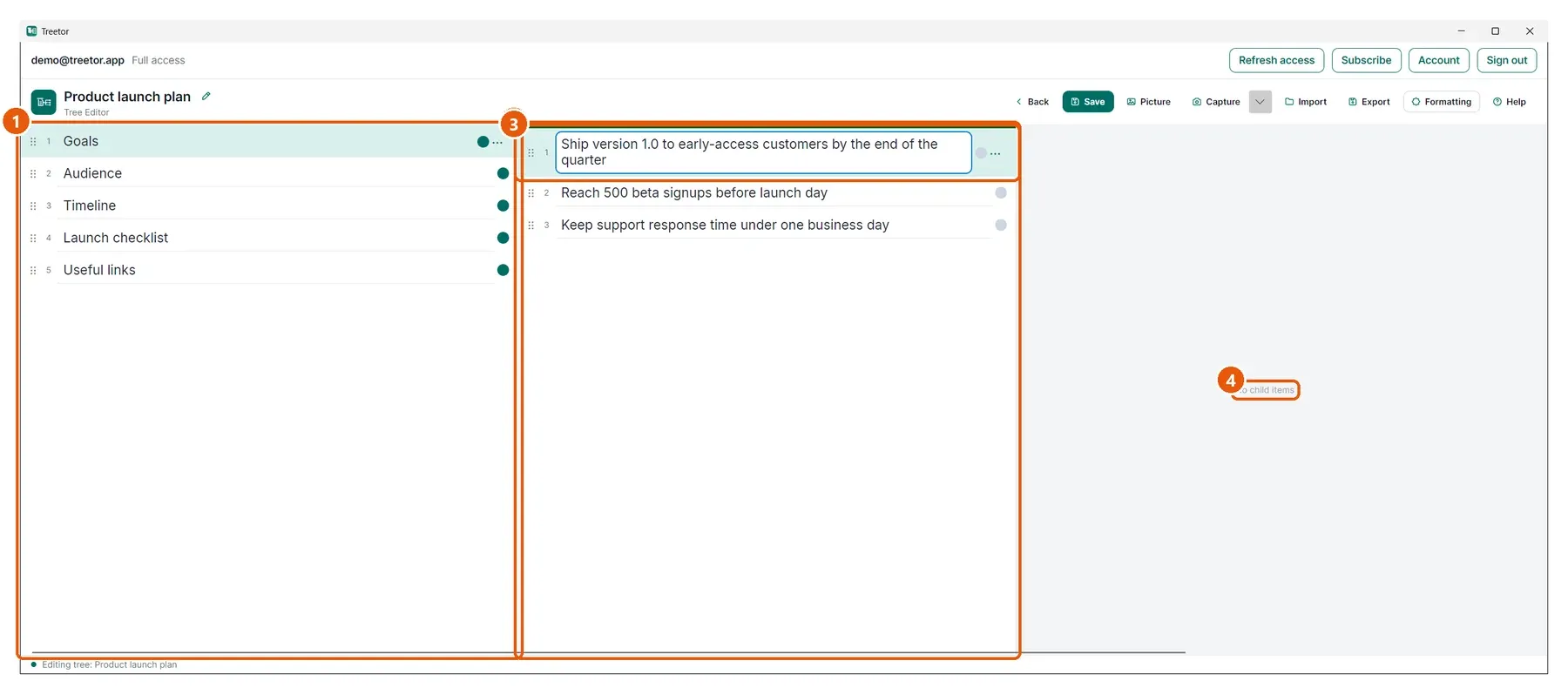
Press Ctrl → to move into an item's children andCtrl ← to step back out. Every level you open stays in the editor as its own column, and the column you are working in always stays in view.
How Single-Branch Focus worksRead the editor layout guideNew · Sync & Backup
Turn on sync when you want it. Treetor encrypts every tree and picture on your device before upload, keeps your computers current, and leaves a working copy safely on each one.
End-to-end encryption means Treetor's servers cannot read your notes or pictures.
Changes arrive automatically. Competing edits become a visible copy instead of silent data loss.
Restore on a new computer or bring back an earlier version as a separate tree.
Now in Treetor 0.1.29
Capture a region or full screen on Windows, macOS, or Linux. Treetor opens it in the annotation editor, then saves the result as a picture item exactly where your work lives.

Grab a focused region for one detail or the full screen for complete context.
Add arrows, shapes, numbered steps, text, highlights, freehand marks, blur, or a tighter crop.
Insert the picture into the active branch, then reopen it later to revise its annotations.
Stop flattening your thinking
Treetor keeps the speed of plain text, then adds the missing shape: books, branches, text items, and picture items you can grow. Bring in Markdown, import a picture, or capture your screen without separating the visual evidence from the thinking around it.
Capture a thought, press a key to add or move the next item, and keep going.
Use built-in annotation tools to call out the exact detail your text refers to.
Turn Markdown headings and lists into a proper Treetor hierarchy instead of one flat note.
The shape of serious notes
Organize work as a tree, write in each text item like a normal note, and place visual evidence beside it as a managed picture item.
Keep a complete project, topic, or body of work together.
Open the part of the idea you need now, without losing the whole map.
Write small, rearrange easily, and let the document grow by intention.
Import or capture visuals, keep them with the tree, and annotate the details that matter.
Keyboard-first organization
Ideas rarely arrive in their final order. Treetor is designed for the moment when your thinking is moving faster than your hands: create, move, nest, promote, and rearrange items with direct keyboard bindings, so organizing never interrupts thinking.
Keep typing and press Ctrl+Enter to add the next thought exactly where it belongs.
Move the current item up or down as your outline changes shape.
Shift an item higher or deeper in the tree without breaking your writing flow.
Jump to a parent, open a branch, or create the next branch from the keyboard.
Built for the way thinking actually flows
Combine written notes and managed pictures in the same branching structure.
Capture a region or full screen from the desktop on Windows, macOS, and Linux.
Keep working files on each device and opt into end-to-end encrypted sync when you want it.
Send a tree out as Markdown, Word, PDF, or a portable Treetor Pack with its pictures.
Where Treetor fits
Plenty of tools can hide, fold, or isolate part of a hierarchy once you ask them to. In Treetor, focused branch navigation is simply how the editor works — there is no mode to switch on before you start.
Outlining tools give you bullets. Treetor gives you editable text and picture items at every level, so the structure, writing, and visual evidence live in one place.
Treetor runs locally with a focused desktop UI and keyboard-first editing. Optional sync stores only encrypted copies, and your editor is never trapped in a browser tab.
No lock-in feeling
Import existing Markdown into a real hierarchy, then export to Markdown, Word, PDF, or a portable Treetor Pack — your trees move with you, in formats your other tools already speak.
Use cases for visual thinking
Use pictures when seeing matters, words when explaining matters, and a tree when both need a durable place.
Product & engineering
Capture the broken state, point to the exact control, blur private data, and file the picture beside reproduction steps and decisions.
Training & operations
Number each click on a captured screen, add concise instructions, and organize the sequence into a reusable process tree.
Research & learning
Save charts, diagrams, source material, and visual references as picture items directly under the topic they support.
Planning & review
Mark up mockups, dashboards, and documents with arrows, shapes, highlights, and text while the surrounding tree keeps the larger plan clear.
Find your workflow
Treetor sits at the intersection of hierarchical information, mind maps, outliners, structured notes, tree editors, and knowledge organization.
Treetor is a keyboard-first hierarchical information app for organizing complex ideas, structured notes, research, plans, pictures, and exports in a local-first tree.
mind map alternativeLooking for a mind map alternative? Treetor organizes ideas as keyboard-editable trees with structured notes, picture items, and export-ready hierarchy.
keyboard outlinerTreetor is a keyboard-first outliner and tree editor for creating, moving, indenting, outdenting, and reorganizing structured notes quickly.
structured notes appTreetor is a structured notes app for people whose research, plans, procedures, and visual evidence need an editable hierarchy instead of flat pages.
tree editor appTreetor is a tree editor app for building and rearranging nested text and picture items across projects, research, plans, and documentation.
knowledge organization toolTreetor helps organize complex knowledge into rearrangeable hierarchies with structured notes, screenshots, annotations, and export-ready trees.
single-branch focusSingle-Branch Focus is how Treetor presents a large tree: one column per level, one active branch at a time, the parent column beside it, and the next level previewed as you go deeper.
focused tree editorTreetor is a focused, keyboard-first tree editor for deep outlines: work one branch at a time and restructure every item without reaching for the mouse.
Common questions
Single-Branch Focus is Treetor's way of presenting a large tree as a sequence of connected levels. Treetor shows one column per level, gives your typing to a single active column, keeps the level you came from beside it, and previews the next level to its right.
Treetor is a focused, keyboard-first tree editor for organizing structured notes, pictures, screenshots, research, and plans as a hierarchy, with optional end-to-end encrypted sync across devices.
Yes. Treetor supports mind-map-like structured thinking, but it uses a clean keyboard-editable tree instead of a freeform diagram canvas.
Yes. Treetor includes shortcuts to move items up and down, indent items into the item above, and outdent them back to the parent level.
Yes. Optional end-to-end encrypted sync keeps your trees and pictures current across your devices while your working copy stays on each computer.
Text notes free. Pro $29.99 once. Sync from $3.99/month billed yearly
Get Treetor for Windows, macOS, or Linux. Text notes stay free, and Pro starts with 30 days, no card.