
Arranging items
Move an item up or down its column, push it one level deeper under the item above, or pull it back out to the parent level — from the Arrange menu or with Ctrl and Alt plus the arrow keys.
The Arrange menu
Right-click an item (or click its ⋯ button) and open Arrange. Every entry has a keyboard shortcut, shown beside it.
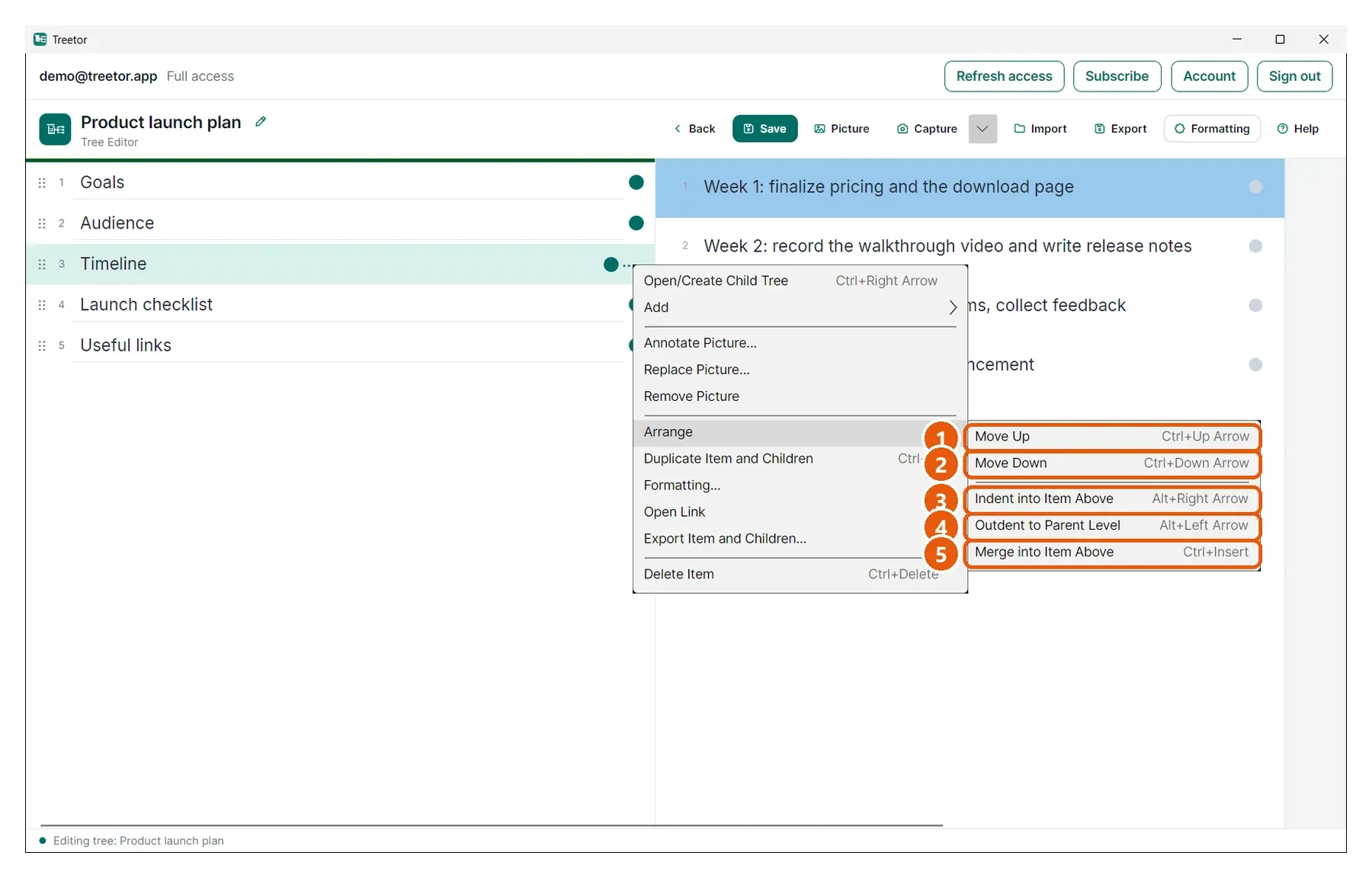
- Move Up — Ctrl+↑. Swaps the item with the one above; children travel with it.
- Move Down — Ctrl+↓.
- Indent into Item Above — Alt+→. The item becomes the last child of the item above it. If that item had no children, it becomes a branch — its dot turns teal.
- Outdent to Parent Level — Alt+←. The item leaves its parent and becomes the last item in the parent's column.
- Merge into Item Above — Ctrl+Insert. Folds this item's children into the item above, then removes the empty item. See Duplicate, merge, delete.