
The item context menu
Right-click any item — or click its ⋯ button — for every action that applies to it. The menu is the map of what you can do to an item; this page is the legend.
Everything you can do to an item
The menu is the same from the right mouse button and from the ⋯ button. Entries with a shortcut show it on the right.
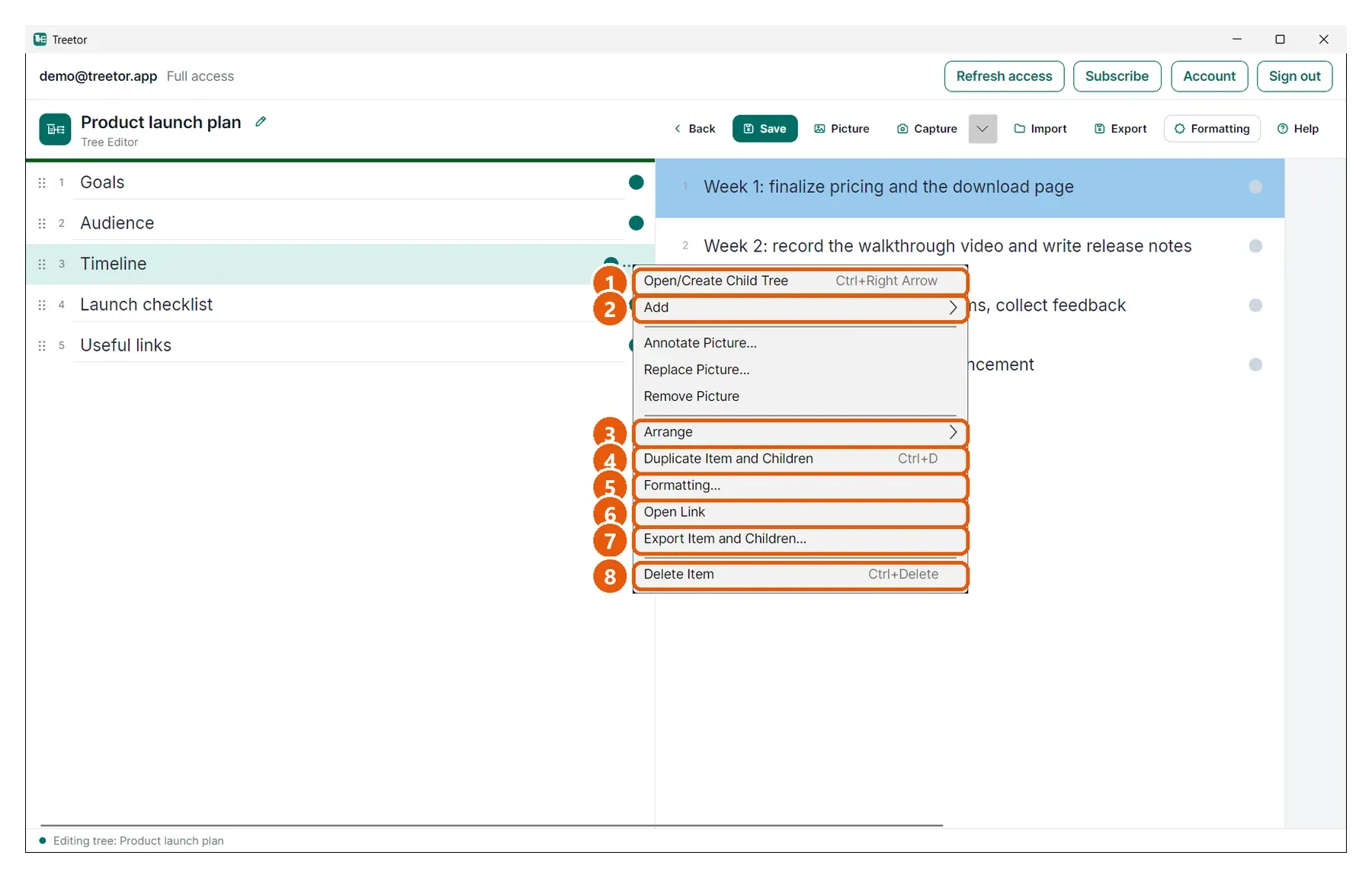
- Open/Create Child Tree — Ctrl+→: moves into the item's children, creating the first one if there are none.
- Add — a submenu: New Text Item Below (Ctrl+Enter), Picture from File… (Ctrl+Shift+I), Capture Region (Ctrl+Shift+C) and Capture Full Screen.
- Arrange — Move Up/Down, Indent, Outdent, Merge — see Arranging items.
- Duplicate Item and Children — Ctrl+D.
- Formatting… — opens the formatting panel with this item's custom formatting selected (Part 5).
- Open Link — opens the item's web address, file or folder; only enabled when the text is a link.
- Export Item and Children… — exports this branch on its own (Part 6).
- Delete Item — Ctrl+Delete; reads Delete Item and Children… when the item has children.