
Export to Word & PDF
Word and PDF exports produce a document people can read without Treetor: headings for branches, indented paragraphs for items, pictures scaled to fit the page.
Pick Word or PDF
Both formats use the same page layout; choose by what the reader will do with it.
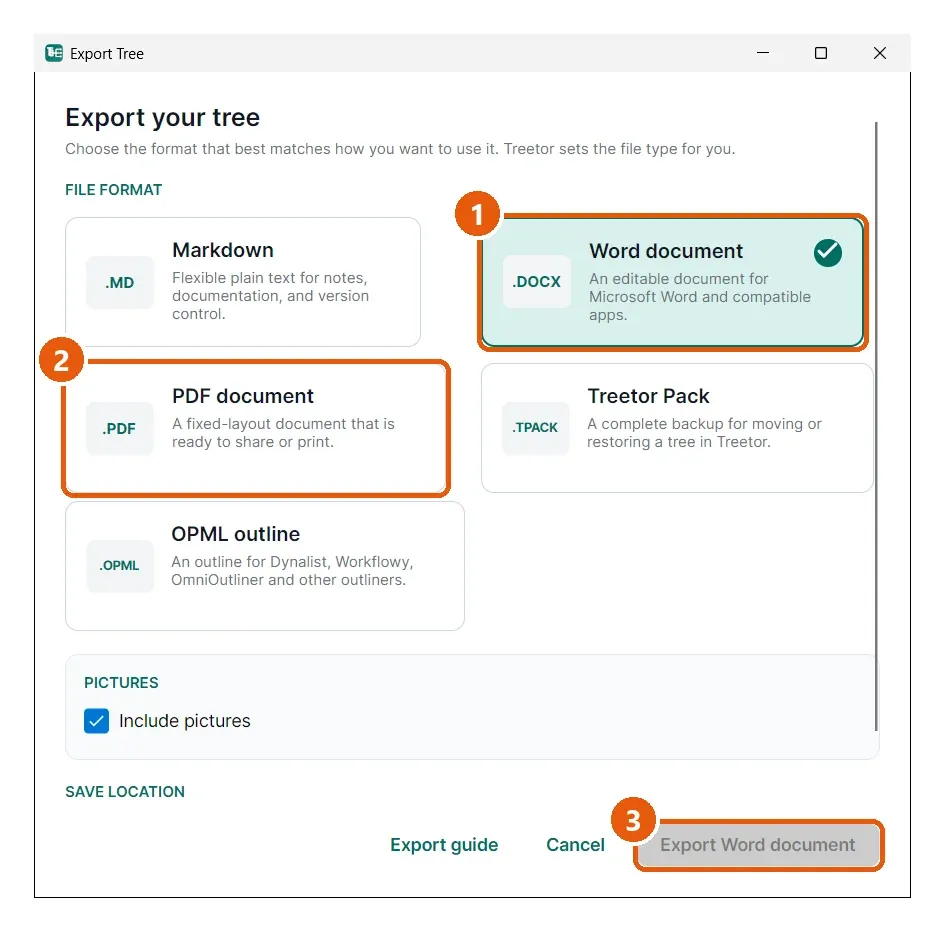
- Word document — editable in Word, LibreOffice, Google Docs. Pick this when someone will rework the text.
- PDF document — fixed layout. Pick this to share or print exactly what you see.
- Export Word / Export PDF — writes the file to the chosen location. Include pictures, shown for every format, puts each picture under its caption at the right depth; untick it for a text-only document.
Page layout
The tree title is the document title. Each root item becomes a heading; items underneath it become paragraphs indented by level, with their pictures placed below the text. Pictures are scaled down to the page width; small pictures keep their size. Captions are printed under pictures.
Export Finished With Warnings
If a picture file is missing or cannot be read, Treetor still writes the document and shows Export Finished With Warnings with the item names it skipped. Open those items in the editor, use Replace under the picture, and export again.