
Export to Markdown
Markdown export writes your tree as headings and nested lists that any editor, wiki or git repository understands. Pictures can travel in a folder next to the file or be embedded inside it.
Choose how pictures travel
Selecting the Markdown card reveals the Pictures options.
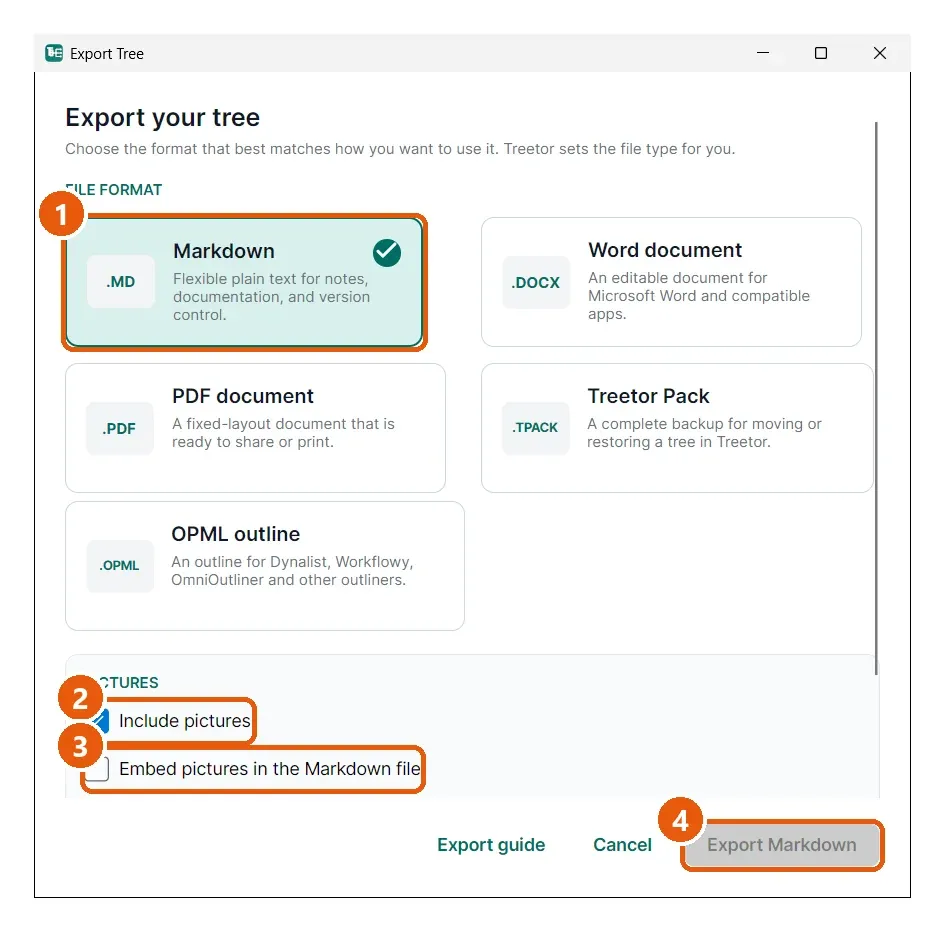
- Markdown — the selected card.
- Include pictures — untick to export text only.
- Embed pictures in the Markdown file — ticked: each picture is stored inside the .md file as data, so one file carries everything (large, but portable). Unticked: pictures are written as image files in a folder next to the Markdown file and linked from it.
- Export Markdown — writes the file to the chosen location.
What you get
For a tree exported as launch-plan.md with pictures not embedded:
- launch-plan.md — the tree title as the first heading, each root item as a heading, deeper items as nested list entries, and picture captions as image links.
- launch-plan_files/ — a folder beside it with one image file per picture, named so the links resolve.
Keep the file and the folder together when you move or share them.